mercredi 12 juillet 2017

GARKA TA ZAMANI ( KOTAM TCHEY)

Innaa nihin, gonal zamanii, Gonaa ko kouma , Kotam tchan Gona ko Garka, Wan da a key koyar illimi, toun da Wanan kotam tchan Gona yana sa a ganey maa harakal yana yin, zahi da leyma wanda itatchey soukey boukatta.


samedi 7 mai 2016

ZAHI da LEYMA


AWAN ZAHI   DA LEYMA

A wannan cha hin za mou yi zantchey bissa awna zahi ( Temperature) kouma da leyma (Humidité).
Afannin wannan ayki chinney kamal in anna boukatar awna zahi da leyma a  wouri, moussali kamar gourin da a key kin-key sar koye, a na san zahi  da leyma sou saya kasou rika yawan saw yawa.


Kayan da za ayi boukata

- Arduino uno 
- Aboun kallo ( écran lcd)
-Aboun daw kan zahi da leyma (capteur de température et humidité  DHT11)


Sarin  wayoyi

Fritzing

Aboun kallo a key dorawa boussa Arduino a na lissahi a kan sounayan  wayoyin ( pins)


Hotan Aboun kallo boussa Arduino

A chirin da akey sawa tchi kin arduino:

#include <LiquidCrystalFast.h> //Librairie pour l'écran LCD
#include <DHT.h> //Librairie pour le capteur DHT

LiquidCrystalFast lcd(8, 9, 4, 5, 6, 7); //Initialisation de l'écran LCD avec les numéros des pins utilisés 
#define DHTPIN 3 //Pin auquel est connecté le capteur DHT

#define DHTTYPE DHT11 //Si vous utiliser le DHT 11
//#define DHTTYPE DHT22 //Si vous utiliser le DHT 22  (AM2302)
//#define DHTTYPE DHT21 //Si vous utiliser le DHT 21 (AM2301)

const int intTimePause = 1000; //Par défaut on actualise les valeures toutes les 5 secondes

float fltHumidity; //Pourcentage d'humidité mesuré
float fltTemperature; //Température mesurée en Celsius

DHT dht(DHTPIN, DHTTYPE); //On initialise le capteur DHT

void setup()
{
  lcd.begin(16, 2); //On indique le nombre de colonnes et de lignes de l'écran
  lcd.clear(); //On efface tout ce qui se trouve sur l'écran
}

void loop()
{
  fltHumidity = dht.readHumidity(); //On lit le pourcentage d'humidité
  fltTemperature = dht.readTemperature(); //On lit la température en degrés Celsuis
  if (isnan(fltTemperature) || isnan(fltHumidity)) //Si les valeures retournées ne sont pas des nombres :
  {
    lcd.setCursor(0, 1); //Positionnement du curseur
    lcd.print(DHTTYPE); //On affiche le type de capteur
    lcd.setCursor(5, 1);
    lcd.print(" illisible"); //On affiche l'erreur
  }
  else
  {
    //mise en forme et affichage des informations sur l'écran LCD
    lcd.setCursor(0, 0); //Positionnement du curseur
    lcd.leftToRight();  // indique que le texte doit être déplacé vers la gauche
    lcd.autoscroll();   // rend automatique ce déplacement
    
    
    //lcd.setCursor(9, 0);
    //Affichage de la température
    //if (fltTemperature >20)
    {
      lcd.print(fltTemperature );
      //lcd.print("confort");
  
    }
      //else
    { lcd.setCursor(0, 0);
      lcd.print("Temp:");
      lcd.print(fltTemperature); 
    
    //delay(400); 
     
    lcd.setCursor(12, 0);
    //lcd.print("Degre:"); //Affiche le caractère ° (degrés)
    }
    lcd.setCursor(11, 0);
    lcd.print("Celc"); //En degrés Celsuis
    lcd.setCursor(0, 1);
    lcd.print("Humidite : ");
    lcd.setCursor(11, 1);
    lcd.print(fltHumidity); //Affichage de l'humidité
    lcd.setCursor(15, 1);
    lcd.print("%");
  }
  delay(intTimePause); //On actualise les informations toutes les x millisecondes.
}


dimanche 2 août 2015

Rouboutou mey Zouwa da zawwa

A thikin wanan chahin, za mou goua da moukou yan da za a sa rouboutou ya houto kouma ya rouka zouwa da zawa a boussa ABOUN GANI.
ABOUN GANI da zoumou ayki da chi, ya na da sounaa (LCD SHIELD V1.1) a na samoun chi a site kin internt na tchana. Dadin chi, wajan ayki, tin da a na dora chi a kan arduino, saboo da kapa pouwa da ye da.


                                                                         Hotan Arduino Uno da ABOUN GANI


          Hotan ABOUN GANI  a boussaa Arduino


Rouboutou mey zouwa da zawwa

Sarin da a key sawa tchikin Arduino:
/*
  LiquidCrystalFast Library - scrollDisplayLeft() and scrollDisplayRight()

 Demonstrates the use a 16x2 LCD display.  The LiquidCrystalFast
 library works with all LCD displays that are compatible with the
 Hitachi HD44780 driver. There are many of them out there, and you
 can usually tell them by the 16-pin interface.


  The circuit:
 * LCD RS pin to digital pin 12
 * LCD WR pin to digital pin 10
 * LCD Enable pin to digital pin 11
 * LCD D4 pin to digital pin 5
 * LCD D5 pin to digital pin 4
 * LCD D6 pin to digital pin 3
 * LCD D7 pin to digital pin 2
 * 10K resistor:
 * ends to +5V and ground
 * wiper to LCD VO pin (pin 3)


 http://www.pjrc.com/teensy/td_libs_LiquidCrystal.html
 http://www.arduino.cc/en/Tutorial/LiquidCrystal
*/

// include the library code:
#include <LiquidCrystalFast.h>

// initialize the library with the numbers of the interface pins
LiquidCrystalFast lcd(8, 9, 4, 5, 6, 7);
         // LCD pins: RS  RW  EN  D4 D5 D6 D7

void setup() {
  // set up the LCD's number of rows and columns:
  lcd.begin(16, 2);
  //lcd.setCursor(0,7);
  // Print a message to the LCD.
  lcd.print("ARDUINO HAOUSSA");
  delay(10000);
}

void loop() {
  // scroll 13 positions (string length) to the left
  // to move it offscreen left:
  for (int positionCounter = 0; positionCounter < 13; positionCounter++) {
    // scroll one position left:
    lcd.scrollDisplayLeft();
    // wait a bit:
    delay(200);
  }

  // scroll 29 positions (string length + display length) to the right
  // to move it offscreen right:
  for (int positionCounter = 0; positionCounter < 29; positionCounter++) {
    // scroll one position right:
    lcd.scrollDisplayRight();
    // wait a bit:
    delay(200);
  }

    // scroll 16 positions (display length + string length) to the left
    // to move it back to center:
  for (int positionCounter = 0; positionCounter < 16; positionCounter++) {
    // scroll one position left:
    lcd.scrollDisplayLeft();
    // wait a bit:
    delay(200);
  }

  // delay at the end of the full loop:
  delay(1000);

}


samedi 1 août 2015

Ko wa yayi bakin kokari

Nazari


Da dey a tchey din illimin da mou ka yi a tchikin yaren mou mou ka yi chi, to da moun hi haka tchin afaninsa, kouma da watsa chi a tchi kin kassa chan mou ya zama wassa.

Zan para da abounda na iya

In na patan kowa zey kawo kokarin sa a koyar da abounda  ya ssani.
Zan yi bayyani boussa, microcontrôleur ( puce électronique) da haoussa zan michi sounan Kaska mey ay ki da wouta. 
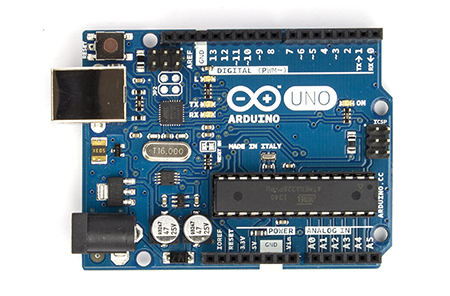
Wassou ya kassar italia soun samou doubara ta keyra wani aboun koyar wa da electronic , wand soukawa sounan ARDUINO.

Arduino an sa agarey chi kaska to campanin ATMEL ( a koy wassou campani), wanda a kassawa sounan ATMEGA 328.
Ta kawo sawki na gaskey a kan ay kin da kaska, ba tarey da an cha wouya ba, kouma ba sey a kachey koudi da yawa ba.


Kaska mey Ayki da wouta 


hotan kaska mey ayki da wouta


Hotan Arduino


Ay ki da Arduino

A tchikin kaska a key sa programme ( Ouzounin) da akey so arduino ya yi ayki da chi,
Kaska dey ta zamana kamar na ou ra tchey karama.


Da mey akey sawa ouzouni a tchikin arduino ?

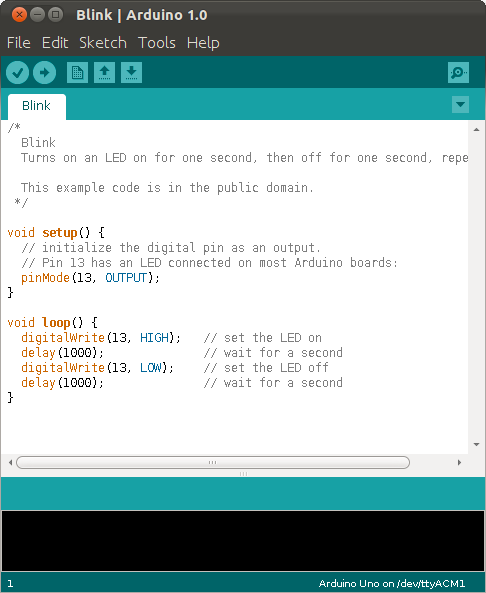
A koy  wani programme ney da a key tchey wa IDE , to da chii ney a key saara doukan izinin kouma a ay ka chi tchikin arduino.
www.arduino.cc


Kayan ay ki da Arduino


-  Bred board : kata kon brodi !


Image result for bred board


-  Gountouar Waya


-  El houtoula ( LED)


- Kokari ( Résistance)


Ay ki na Farii

Inaa so in Kouna keley ja a kofa ta 13, ta kounnou kouma ta moutou.


Image result for cricuit blink arduino